On this page
The Omlet automatic chicken door is worth buying if you want a battery-powered door with phone alerts. It lists at $199 to $259 depending on the model (checked 2026-10-09), and it keeps its schedule on the door when WiFi drops, which is the design that matters. Skip it if you need solar power or keep ducks or geese. Owners report crush-detected errors, schedule glitches and WiFi trouble, and Omlet’s own firmware changelog shows the company fixing the same problem types. This page pulls those reports together with Omlet’s published specs and fix steps, with every source linked. For how I pick sources, see how we research.
Verdict
$229Smart Autodoor with WiFi, omlet.us, checked 2026-10-09
Worth it for most keepers who want alerts on a battery door. The price is high, solar is not supported, and you should update the firmware on day one.
Who should buy the Omlet Autodoor, and who should skip it
Buy it if you want app alerts, a battery door with no wiring, and a maker that publishes its fixes. Skip it if you need solar, keep ducks or geese, or want the lowest price.
Buy it if:
- You want a notification when the door opens, closes or stalls. The Smart Autodoor sends app notifications and works with Alexa and Google.
- You have no power at the coop. Four AA batteries last up to 6 months, and an optional mains cable makes the app more responsive.
- Your coop is an Eglu, a wooden coop, mesh or an Omlet run. Omlet sells attachment kits for the Eglu Cube, traditional chicken mesh and Omlet runs.
- You want a company that sells spare parts and explains its own fault codes in public.
Skip it if:
- You want solar. Omlet offers no warranty, support or advice for other power sources. Shoppers notice: a keeper choosing a door in a September 2026 r/chickens thread found the Omlet reviews mixed on battery life and the battery-and-solar workaround more trouble than it was worth. The solar door guide covers the alternatives.
- You keep ducks or geese. Ducks prefer to sleep outside, so the door does not suit them (Brimwood Farm).
- Price is the main thing. Both owner accounts below name cost as the drawback.
Price and models
The Omlet Autodoor costs $199 for the non-smart version and $229 for the WiFi Smart Autodoor on omlet.us, with a Coop Light adding $30 (checked 2026-10-09). These prices come from the product data on Omlet’s US page, which lists them valid through 2026-10-23. The Smart Autodoor is also sold on Amazon by Omlet Inc, shipped by Amazon, at the same $229 when I checked on 2026-10-20, where it showed 4.2 out of 5 from 479 ratings.
| Model | Price | What you get |
|---|---|---|
| Automatic Chicken Coop Door (non-smart) | $199 | Control panel with light and time modes, no WiFi |
| Automatic Chicken Coop Door with Coop Light | $229 | Same door plus a coop light; Omlet notes the power cable is not included |
| Smart Automatic Chicken Coop Door | $229 | WiFi, app, notifications |
| Smart Automatic Chicken Coop Door with Coop Light | $259 | WiFi door plus a coop light |
| Coop Light (add-on) | $30 | Light that pairs with the door |
| Attachment kits | $12 to $24 | Fit the door to Omlet runs ($12), Eglu Cube Mk1 ($22) or traditional chicken mesh ($24) |
Omlet’s site banner shows a 180-day guarantee linked to its returns page. Read the warranty and returns terms before you buy, because they are not the same as a product warranty.
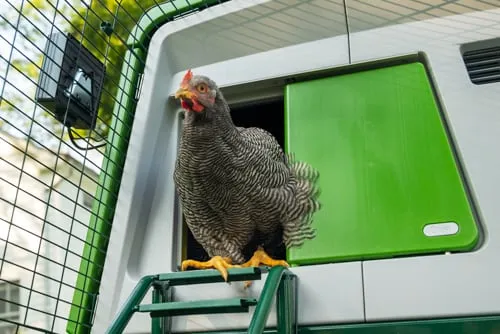
Omlet Smart Autodoor
Keepers who want phone alerts on a battery-powered door that stores its own schedule
- Power
- 4 AA batteries, up to 6 months per Omlet; optional mains cable
- Connectivity
- WiFi and app, Alexa and Google compatible
- Modes
- Light sensor, timer and manual
- Safety
- Sensors stop the door closing if something is in the way
- Cold rating
- Omlet says built to work down to -4°F (-20°C)
- Offline
- Schedule saved in the control panel
- Fits
- Eglu Cube, wooden coops, mesh and Omlet runs with attachment kits
- Keeps its schedule when WiFi drops
- Error message plus app notification when the door stalls
- Runs on AA batteries with no wiring
- Publishes a firmware changelog and sells spare parts
- Battery doors check in with WiFi only every ten minutes, so app commands can wait
- Costs $199 to $259 before attachment kits
- No support for solar power
- Owners report crush-detected and schedule problems
What owners report
WiFi, power and the schedule
The Omlet door runs its schedule from the control panel, so a WiFi outage costs you alerts and remote control, not the evening close. The control panel stores every setting, the door runs as programmed through an outage, and the app resumes when the connection returns. That is the opposite of the WiFi-dependent failure in the door failure guide.
Power changes how the app behaves. A battery door checks in with WiFi every ten minutes to save power, so an app button press can wait until the next check-in. Plug it in if you want the smart features to respond fast. Use only Omlet’s power adapter or 4 AA batteries.
Range matters. Omlet gives 30 feet from your router on the product page and 65 feet from a WiFi source on the support page. Plan for 30 feet and add an extender if the coop sits farther away.
Cold needs a plan. Alkaline batteries run from 0°F to 131°F (-18°C to 55°C), and the Autodoor works down to -4°F (-20°C), per Omlet’s help center. In a long cold spell, take the batteries out and warm them now and then. Keep ice out of the track too; the door failure guide explains how.
Installing and programming the Omlet door
The Omlet door slides sideways only. The motor opens the door horizontally and cannot run vertically, so you need clear wall to one side of the hole, not above it. It fits straight onto the Eglu Pro and Eglu Cube, and with the attachment kits onto wooden coops, mesh and Omlet runs. Eglu Go owners buy a separate Smart Autodoor for Eglu Go coops.
Plan where the control panel goes before you drill. Its bracket screws into wood or fixes to mesh, and you cannot extend the cable between panel and door. The optional mains cable is 5 ft 10 in, so a plug-in door needs an outlet close to the coop.
Program it at the control panel or in the app; the app is optional. Choose a light setting, which is the daylight level that opens and closes the door, or set times. To set the close, watch your hens for a few days, note when they go to bed, and set the door after that, as Omlet advises. Add a margin for the last hen that dawdles. Change batteries when the panel or app shows 5% or lower, and share app access with family so more than one person sees the door status.
If you are upgrading an older Autodoor to the smart version, keep your door and frame and swap only the control panel. Plug the door cable into the port marked for the door, and connect any coop light wiring before you screw the cover back on, so the panel only comes apart once. On power-up the door runs a calibration cycle, then the app scans for WiFi and walks you through naming the door and choosing light or timer settings. Run the cable through a length of PVC pipe if squirrels visit. It is cheap insurance on any door with an exposed cable.
Give the flock a few nights to adjust. Lift any hens still outside onto the roost by hand for the first few nights. The linked coop light, which comes on five minutes before closing, helps draw them in.
Two limits: Omlet designs the Autodoor for adult chickens, so do not count on it for chicks, and the support page gives no opening size, so measure your largest hen against the door before you order.
Alexa, Google and Home Assistant
Alexa and Google Home are the official smart-home links on Omlet’s product page. Home Assistant is not official. A community integration installed through HACS exposes door control, the coop light, and battery, WiFi and sensor data, and the door connects over WiFi with the power adapter (Smart Home Junkie). Homey users have an Omlet Autodoor app too, published by a community developer rather than Omlet, with no direct support.
Use those for alerts and dashboards, not for the close itself. The door’s own schedule lives in the control panel and keeps running when WiFi drops. An automation on a home server adds one more thing that can fail at dusk.
What owners like
Owners praise the reliability, the safety sensors and the saved mornings. Two long owner accounts and a Facebook group member say the same things.
- The Bitchin’ Chickens owner reports the door working since install in all weather with no maintenance. Omlet supplied that door free for the review, which the post discloses.
- Both that owner and the Brimwood Farm reviewer found the sensors keep a bird from being caught. With no mid-track sensor, the door closes fully and then reopens when it touches a chicken (Brimwood).
- The mount opens left or right, inside or outside the coop, and the booklet has clear illustrations (Bitchin’ Chickens). It fits many coops, not only Omlet’s (Brimwood).
- Owners like the peace of mind. A member of a coop-owner Facebook group trusts it not to lock the flock in all day, and Brimwood’s hens are already out when the keeper arrives.
What owners report going wrong
Owner reports cluster around crush-detected and blocked errors, a door acting outside its schedule, WiFi trouble and durability after a few years, plus some install and shipping snags. Omlet’s own changelog covers the first three, which tells you the company knows the problems and ships fixes.
The reports:
- A door bought in January worked fine, then started sticking open (Facebook group).
- An r/BackYardChickens thread asks why a WiFi Omlet door opened outside its scheduled window.
- Another Facebook post asks whether the Omlet auto door has a manual override. It does: manual mode opens and closes only when you press the button, and a failsafe lets you open the door fully by hand.
- A door that retries three times and then faults as blocked, with nothing in the way and the track clean, has an internal fault. Bench-test it off the coop before you call support. If the support link fails, use the contact form.
- A door can also fault with the motors running and the gear not turning. Call support for that one; a short call can be enough to get a replacement queued.
- The Bitchin’ Chickens owner had to build wooden panels because the new door was much smaller than the old opening, and paid $57 in import duties on a shipment from the UK to Canada.
Here is how those problem types line up with the firmware changelog. The changelog does not name owners, so treat this as the same problem class, not proof of the same case.
| Problem class | Omlet changelog entry |
|---|---|
| Blockage or crush errors with nothing in the way | v1.0.37 (2024-09-10) and v1.0.41 (2024-10-02) fixed phantom blockages; v1.0.44 (2025-01-22) adjusted blockage detection to stop phantom blockages |
| Door acting outside its schedule | v1.0.43 (2024-10-29) fixed the door reopening after a manual close before the pre-set closing time; v1.0.49 (2025-06-06) fixed mains-powered doors in time mode opening or closing at the wrong time after a power cut |
| WiFi reconnection | v1.0.35 (2024-07-22) fixed WiFi reconnection after power cuts; v1.0.55 (2026-03-30) lets mains-powered panels reconnect automatically after a server connection loss |
| Battery drain when WiFi is down | v1.0.50 (2025-07-17), v1.0.51 (2025-08-29) and v1.0.53 (2025-10-18) reduced battery drain when the panel can’t reach WiFi or the servers |
Omlet’s fix steps, summarized
Omlet’s Door Fault Troubleshooting guide runs eleven checks and then a parts replacement. Work through them in order:
- Check the firmware is current, using the control panel or the Omlet app (the app needs WiFi).
- Inspect the door for anything blocking it. Owners of the non-smart door can start here.
- Clean the Autodoor.
- Check the roosting rack is in the correct position.
- Recalibrate the door.
- Check that the door and frame are not warped.
- Check the motor.
- Check whether the motor’s gear stay is missing or broken.
- Check the gear rack is in good condition.
- Check the control panel connectors.
- Check the wiring.
- Replace any faulty parts. Omlet sells spares, and customer services can help if the door is under warranty.
The support center sells the parts you are most likely to need: the frame with motor assembly, the sliding door, the removable door rack, the control panel (smart and non-smart), a replacement wire, the retaining bracket and screw packs. A dead motor means a new frame with motor assembly, not a whole new door.
The error that worries owners most is Crush Detected. The sensors found an obstruction, most often a chicken lingering in the doorway. The door nudges it, reopens, retries up to five more times, then stays open and shows the error. Remove the obstruction. On a non-smart door, press OK to clear the error and hold OK to close. On a smart door, press Close in the app. If it returns, update the firmware, clean the door, recalibrate, tighten the fail-safe release screws and check the crush sensors for corrosion, then replace faulty sensors (troubleshooting article).
If you get past step 9 and the door still faults with nothing in the way, file a warranty claim. On the older door, four screws take the unit off the coop, two hold the sliding door in the frame, and lifting the small Omlet key frees the gear so you can check its teeth. While you wait for a replacement, set the panel to manual, open the pop door by day and close the coop by hand each night. Do not trust a door that faults. Keep photos and the firmware version handy for the support call.
A door that stays open after those retries is an open door overnight. Add an independent alert as the door failure guide describes, and read the predator-proof coop guide so the door is one layer, not the only one.
Alternatives
If the Omlet fits your coop and budget, buy it. If solar, a vertical door or a lower price matters more, look at the other brands. ChickenGuard makes a vertical door, the Run-Chicken T50 is a lower-priced door with an app, and Chickcozy sells a solar door. The best automatic doors roundup compares them on power, lock, obstacle sensing and price. The automatic chicken coop doors hub lists every door guide.
Questions people ask
Is the Omlet Autodoor worth it?
For most keepers who want phone alerts and a battery door, yes. It stores its schedule on the door, publishes a firmware changelog and sells spare parts. Skip it if you need solar power or keep ducks or geese. It costs $199 to $259 depending on the model (checked 2026-10-09), and owner reviews call it expensive.
Why does my Omlet door say crush detected?
Its safety sensors found something in the doorway, most often a chicken lingering there. The door nudges the obstruction, reopens, retries up to five more times, then stays open and shows the error. Clear the doorway and reset it from the control panel or the app. If it keeps happening, update the firmware, clean the door, recalibrate and check the sensors for corrosion.
Does the Omlet door work without WiFi?
Yes. The control panel stores every setting, so the door keeps its schedule through an outage and the app reconnects when WiFi returns. You lose remote control and notifications while WiFi is down. Battery doors check in with WiFi only every ten minutes.
How much does the Omlet Autodoor cost?
On omlet.us the non-smart Autodoor lists at $199 and the WiFi Smart Autodoor at $229, checked 2026-10-09. Adding the Coop Light costs $30 more. Attachment kits for runs, mesh or an Eglu Cube run $12 to $24 depending on the coop.
Can I run an Omlet door on solar power?
Run it on the power adapter or 4 AA batteries. Omlet offers no warranty, support or advice for other power sources such as solar. If solar is a must, see the solar door guide.
Does the Omlet door work with Home Assistant?
Not officially. Alexa and Google Home are the official links. Home Assistant owners use a community integration installed through HACS, which exposes door control, the coop light and battery data (Smart Home Junkie). Keep the door's own schedule as the main close, because it runs from the control panel without WiFi.
Sources
- Omlet US: Smart Automatic Chicken Coop Door (product page and prices)
- Omlet US: Automatic Chicken Coop Door support center
- Omlet help center: Door Fault Troubleshooting
- Omlet help center: What does the Crush Detected message mean?
- Omlet help center: Crush Detected Troubleshooting
- Omlet help center: Smart Autodoor firmware changelog
- Omlet help center: Does cold weather affect the batteries?
- Bitchin' Chickens: Omlet automatic coop door, my experience (owner account, door supplied free by Omlet)
- Brimwood Farm: Omlet automatic chicken door review (owner account)
- r/chickens (September 2026): Automatic / solar powered coop door recs?
- Amazon listing: Omlet Smart Autodoor, sold by Omlet Inc (checked 2026-10-20)
- Omlet US: Smart Autodoor for Eglu Go coops
- Smart Home Junkie: Home Assistant Omlet auto door setup review
- Homey: Omlet Autodoor community app

Written by Kyle
Kyle has kept backyard chickens on his own small farm for five years. He reads the extension research, the spec sheets and the owner complaints, then tells you what he would buy and what he would skip.